PhreeLabsStart a Project
Custom Software Studio · West Palm Beach

Custom software, websites, and workflow tools. Built around the work you need to do and the value it should create.

Software That Fits You and Your Logic

01 / Custom SoftwarePeople First. Software Second.

Stop bending
to your tools.

Repeated work, disconnected systems, and unreliable software have a cost. PhreeLabs turns your process into a focused tool, repairs what is holding it back, or builds the site that helps people understand your offer and take action.

Four Ways to Start
02

Fix or Finish Existing Software

Recover a stalled project or repair unreliable software. Find the cause, decide what code is worth keeping, and verify the repair against the failure.

Creative and Personal Tools

Give Your Process a Dedicated Tool

Bring repeated steps, creative constraints, and outputs together in a tool built for your practice. Keep the process that makes the work yours, with a dedicated way to carry it out.

Creative WorkflowsPersonal ToolsDesktop Apps
Business Systems

Put Your Business Rules to Work

Make a critical process repeatable, connect the tools behind it, or give a new product its first working version. The scope starts with the rules, people, and output the work requires.

Internal ToolsWorkflow AutomationCustom Software Engines
Value Before Features

Make the work worth
the investment.

A useful build earns its place in your business or creative practice. Define what should improve, what you want to control directly, and the complete first workflow that can demonstrate it.

Recover Capacity
Less repeated entry, checking, and rework. Compare the time and effort to finish the same task.
Protect the Work
Rules, validation, and recovery where mistakes are costly. Check the failure paths as well as the successful run.
Make the Next Step Possible
A product people can use or a site buyers can act on. Define the completed action that matters.

The expected benefit needs to justify the build, running costs, and upkeep. Your starting point determines what is worth doing.

How We Scope for Value Capabilities With Proof
02 / In the LabOriginal Software in Progress

Original software.
Inside the builds.

Selected in-house builds: a native video-creation app, an original game engine, the authoring app made for it, and a marketing decision app. Each one started as a problem worth its own software.

001Explainer Studio

v2 · In Development
Exported video · Loyalty Penalty development demo, 1:15 · Not the editor interface Open Full Video
Native Mac App / Swift, AppKit

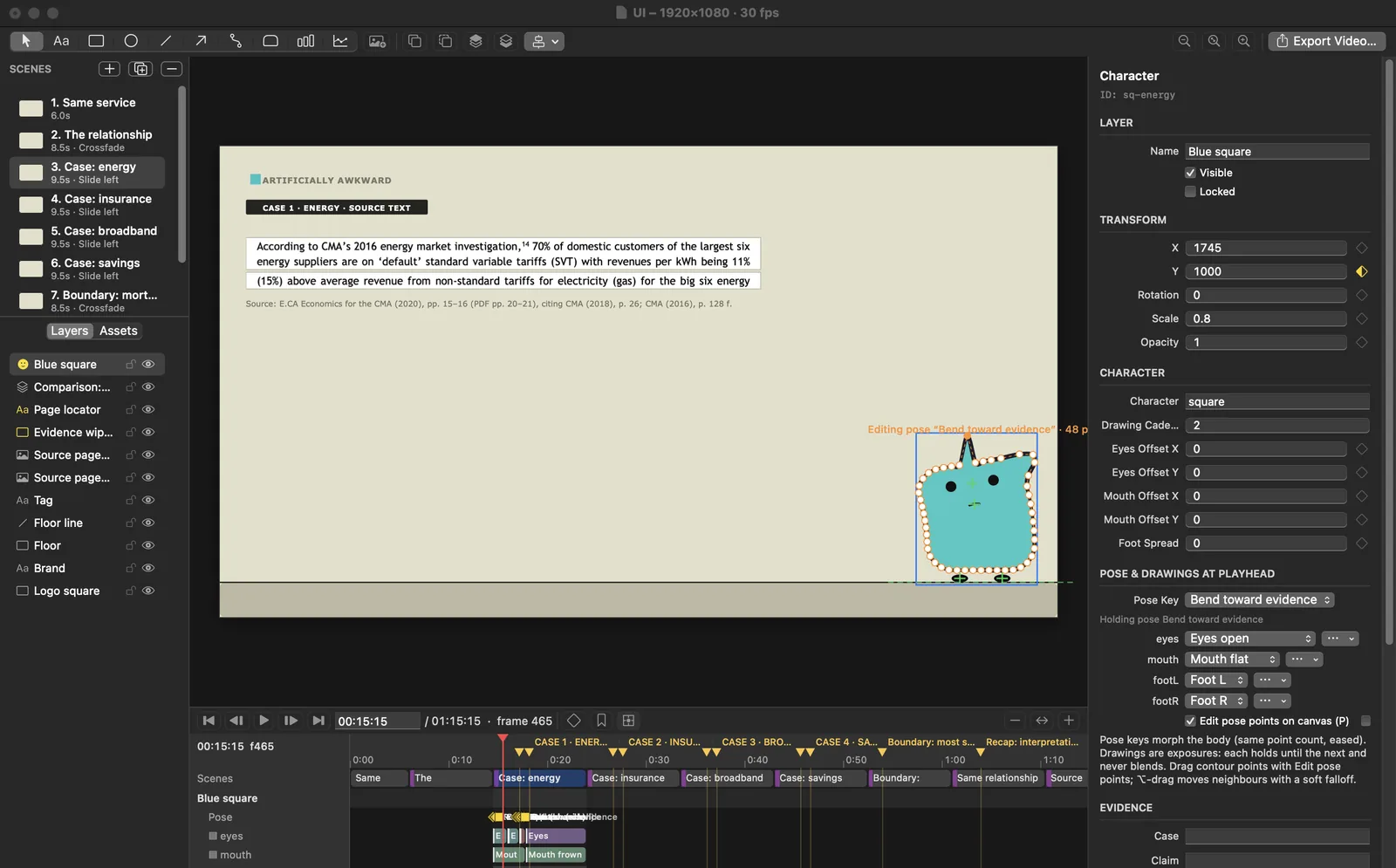
A native Mac app for building animated explanations. Character poses, animated colors, linked comparison cards, and source references stay in one editable project, exported as video with narration, music, and clip audio.

Problem
Turning sourced research into a clear animated explanation, with every claim tied to its source.
Solution
An editor with pose-point editing, numeric and color keyframes, source-linked cards, mixed audio, and video export at whole-number or 23.976, 29.97, and 59.94 frame rates. Scripted edits can also reach the open project.
Explainer Studio v2 on macOS: the pose editor reshaping a character's outline on a scene that quotes a cited CMA report, with the scene list, layers, timeline and inspector visible.
Editor interface · App screenshot · Pose editing on a source-cited case scene

002Webs

In Development
Webs project artwork: a sharp metallic W connected by white web strands against black.
Webs identity artwork · Not a gameplay screenshot
Original 2D Engine / C++, Lua, Python

An original engine for 2D platform-fighting games. Its runtime brings together character movement, platforms, collision, combat, animation, and scene playback.
Problem
A platform fighter needs its own rules for movement, platforms, hits, and timing.
Solution
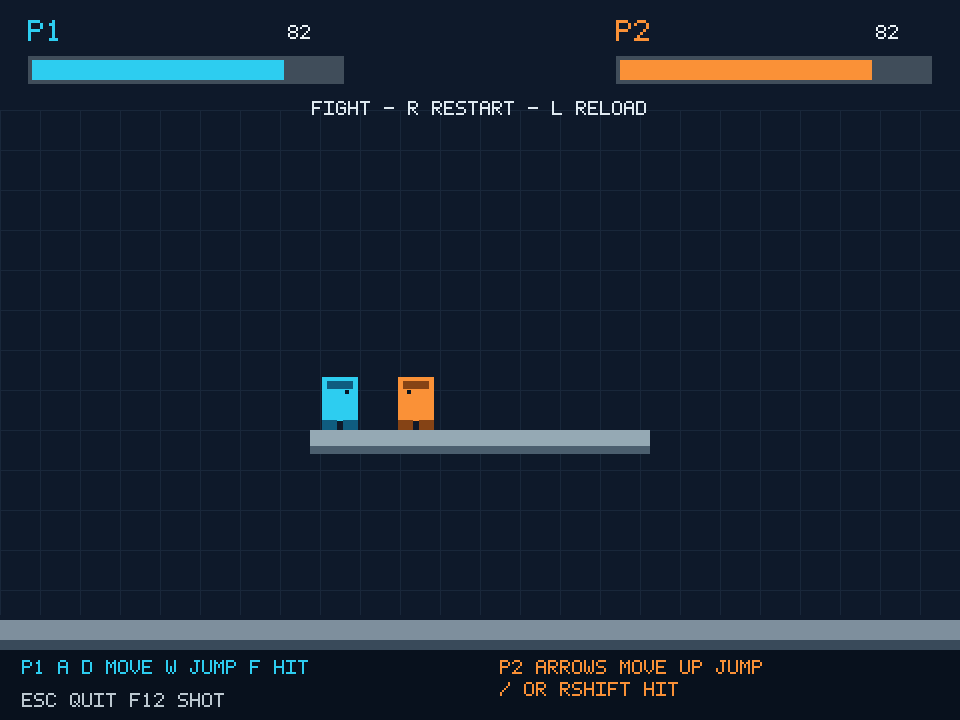
A C++ simulation with editable Lua rules: two players move, jump, attack, guard, and throw. Buffered inputs and motion-command specials run on the same fixed tick, in a self-contained Mac app.
Webs first playable match: a blue and an orange player on a floating platform above a floor, with health bars for P1 and P2 and on-screen controls.
First playable milestone · Engine capture · Development shapes, no third-party assets

003Architect

In Development
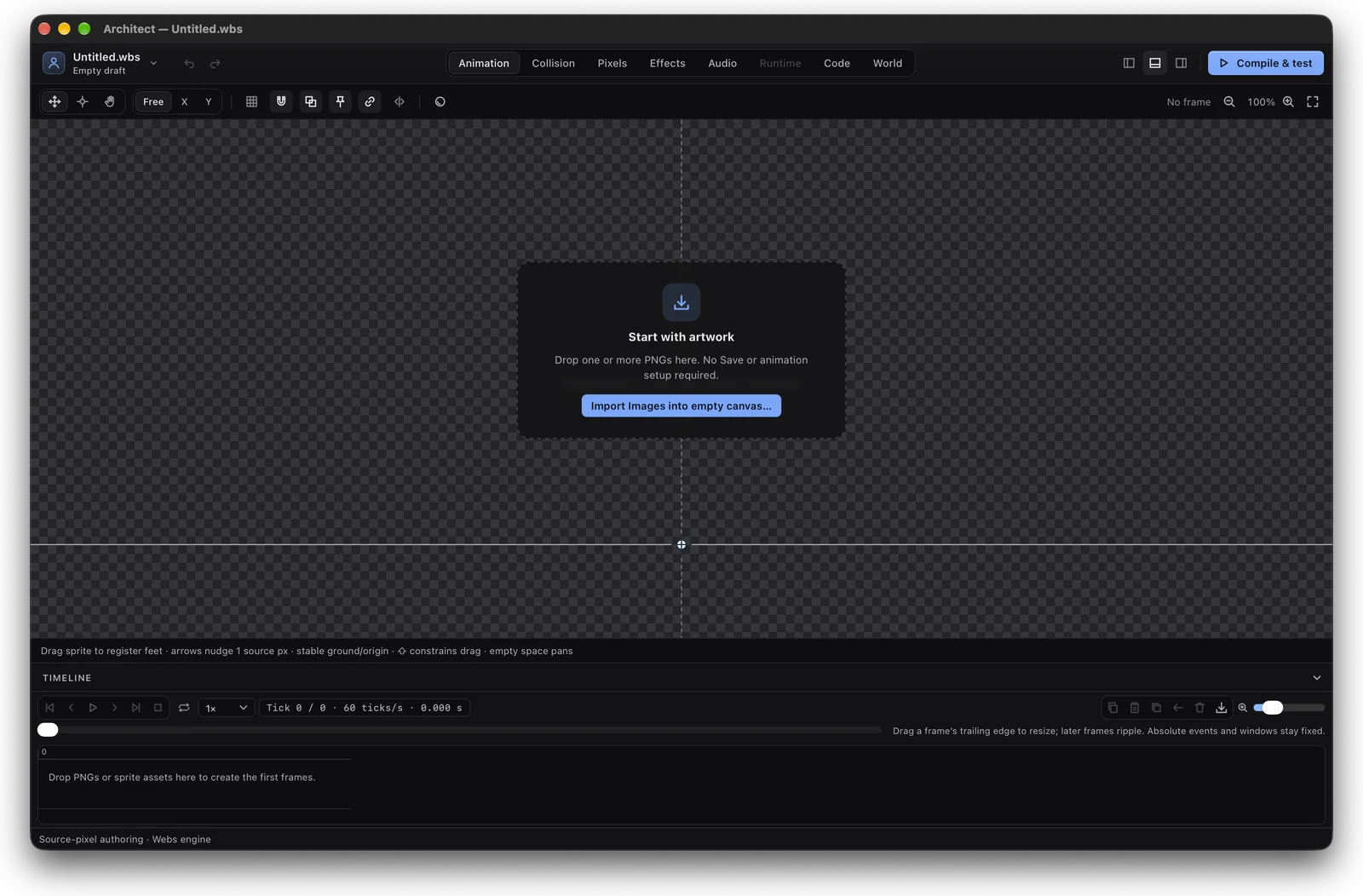
Architect on macOS: an empty Animation workspace with the Start with artwork prompt, tabs for Animation, Collision, Pixels, Effects, Audio, Runtime, Code and World, a Compile and test button, and the timeline at 60 ticks per second.
Animation workspace · App screenshot of the current build
Mac Authoring App for Webs / AppKit, React, Python, C++, Lua

The desktop app for making games on the Webs engine. Start from PNG artwork, then build animation, collision, pixel art, effects, audio, code, and worlds in one project. Scenes compile and run in the native engine for testing, and a finished scene or menu screen packages into a playable Mac game.
Problem
A Webs game needs art, animation, hitboxes, stages, and scripts that match the engine exactly.
Solution
One Mac app for artwork, animation, hitboxes, effects, audio, code, and worlds, with native-engine tests and playable Mac packaging. Menus support music and button sounds, settings persist across launches, and moves can be marked as throws.

004MarketHaven

In Development
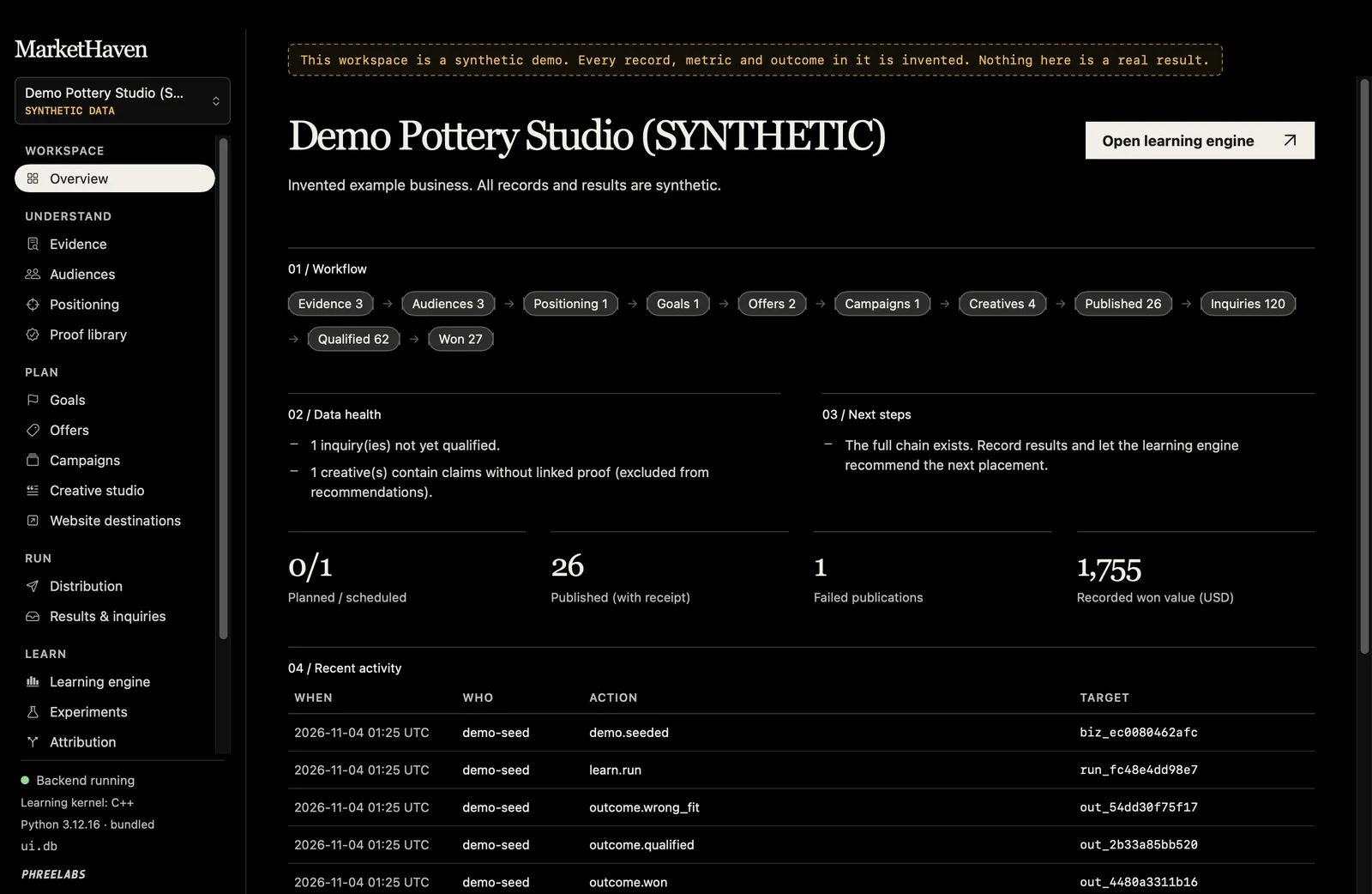
MarketHaven on macOS showing its synthetic demo workspace: a banner stating every record is invented, the Demo Pottery Studio (SYNTHETIC) overview with a workflow from evidence through inquiries, data health notes, next steps, and recent activity.
Overview · Earlier native build · Synthetic demo data, not real results
Native Mac Marketing App / SwiftUI, Python, SQLite, C++

A native Mac app for marketing decisions. It links evidence, audiences, offers, campaigns, creative, and website results in one local record, then recommends where to place the next effort and shows how sure it is.

Problem
Marketing choices get made from scattered notes and dashboards, and it is hard to tell which post led to which inquiry.
Solution
A local workspace for drafting, asset review, a publish queue, receipts, and measurement. Social, consent-only email, and ad adapters keep approved content tied to its result, using owner-authorized provider connections.

These are PhreeLabs’ own products, not client commissions. Explore what each one does, the engineering behind it, and the evidence from the build. All Work

03 / Coming NextProposed Feature · Not Built

A Proposal
For Architect

No additional products are announced. The remaining proposal explores reviewing game-art and animation revisions in Architect before they reach a playable build.

No release date or sign-up.

Explore the Architect Proposal

04 / The ApproachA Focused Place to Begin

Define the job.
Then build.

See the Full Process
01

Map the Real Task

Start with the people, inputs, rules, and results. What should the software make possible, and what must it get right?

02

Choose the First Working Version

Agree on the essential functions, technical constraints, and how the result will be checked. Keep the first build focused enough to evaluate.

03

Test It Against the Work

Try the software on the task it was built for. Review what works, what needs changing, and which additions are worth making next.

05 / Start a ProjectFrom an Idea to a Written Plan

What should your
software do?

PhreeLabs is led by Dervens Philemond. The studio’s work spans creative applications, custom engines, and tools for specific workflows. A project can start from a process to improve or an idea that needs its own software. Based in West Palm Beach, Florida, working with clients locally and remotely.

Tell me what’s slowing you down and what you want instead. A rough outline is enough.

Prefer email? This opens your email app.
