
01 Purpose
Explainer Studio makes the videos for Artificially Awkward, a YouTube channel that explains recurring patterns such as money flows and pricing.
Intended user: a creator producing sourced explainer videos, who needs character animation, diagrams, and evidence in one editable project.
02 Problem and Constraints
In a general-purpose video editor, a quoted figure is plain text with no link to where it came from. One wrong number can undo a whole video.
- Native macOS only: Swift and AppKit, with no web view or Electron.
- Preview and export must match frame for frame.
- Every action must be scriptable, not only clickable.
03 What Was Built
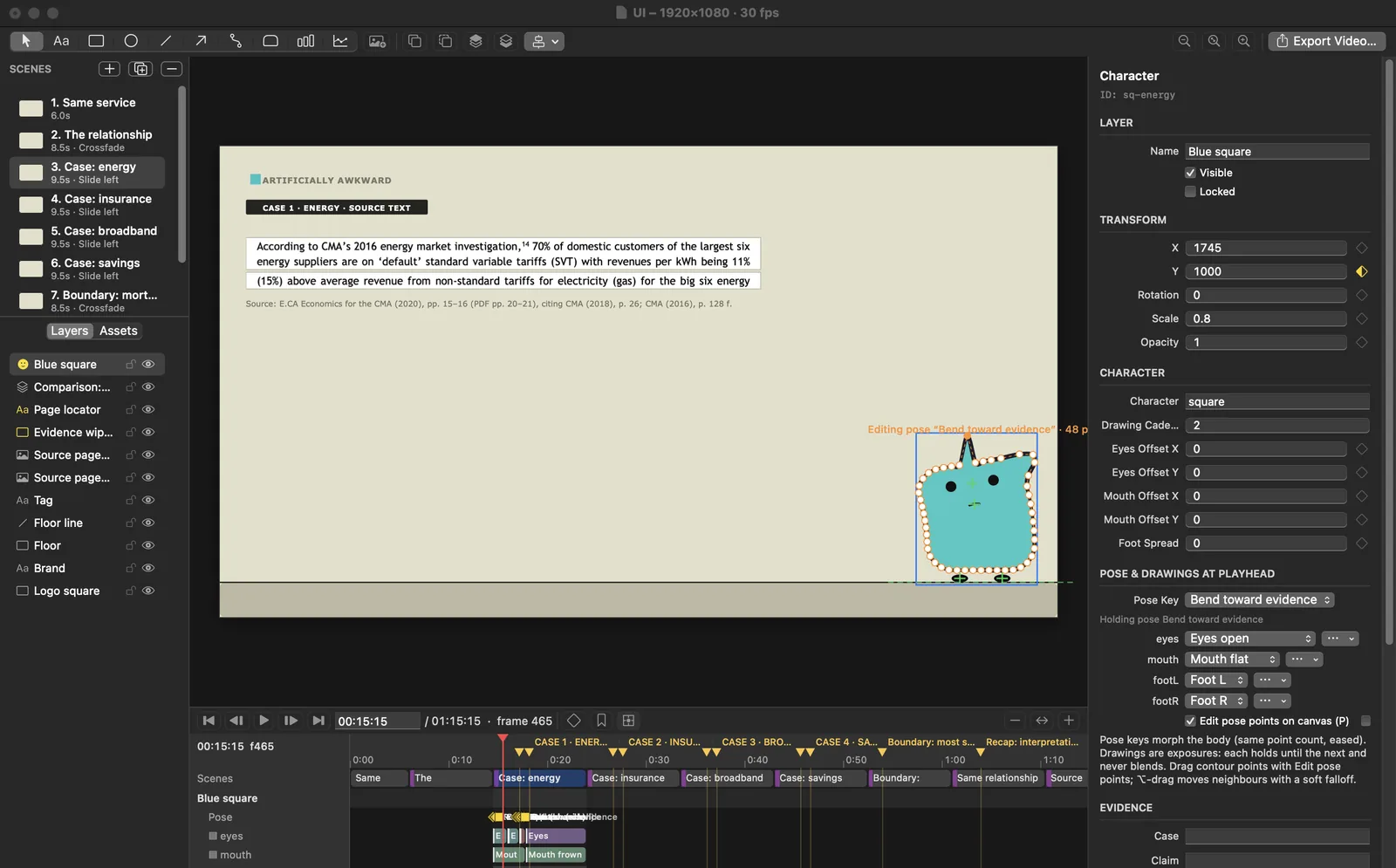
- Editable scenes with text, shapes, connected diagrams, charts, images, video, and audio, exported to H.264 MP4 with mixed audio, including the sound inside video clips.
- Keyframe animation of numbers and colors with linear, hold, and eased interpolation. Fill, stroke, text, subtitle, and axis colors blend in linear light.
- Character rigs with editable body poses, anchored eyes and feet, and drawing exposures with holds and onion skin. A new outline point is added to every pose, so morphs stay valid.
- Linked before/change/after comparison cards: editing the master updates every case unless a case overrides it.
- Evidence records: on-screen text bound to a claim with its source, page, and quote; unsourced figures are flagged.
- A command-line tool and a local MCP server running the same 107 commands as the app. With the project open in the app, the MCP server edits that window live, in its undo history. Video export runs from the app or command line.
- Rational frame rates: 23.976, 29.97, and 59.94 alongside whole numbers, with frame-based timing.
- Autosave every 15 seconds, and conflict-safe saving between the app, the command line, and MCP.
04 Design and Engineering Decisions
- 01
One Command API for Every Surface
The app, the command line, and the MCP server all call one typed command registry. Undo, validation, and revision checks live in one place, so a scripted edit behaves exactly like a click.
- 02
One Renderer for Preview and Export
The canvas and the exporter draw with the same Core Graphics renderer. Parity is measured, not assumed: exported frames are compared against preview renders.
- 03
Evidence as Data, Not Text
A quoted figure is a record with its source, page, and quote. Bound on-screen text updates when the claim changes, and validation flags literal figures with no source.
- 04
Saves That Refuse to Overwrite
Every write carries the document revision it expects. A stale write from another session is refused, and the editor shows a conflict instead of silently replacing work.
- 05
Core Graphics Before Metal
A cold 1080p frame rendered in 7.7–45.4 ms, fast enough that a Metal renderer would add complexity without need.
05 Architecture
06 Verified Results
| Measure | Result | Context |
|---|---|---|
| Automated tests | 52 of 52 passing | XCTest suite, 4 November 2026 |
| App interaction checks | 22 of 22 passing | Scripted runs of the real canvas, inspector, menus, playback, and a live MCP connection, 4 November 2026 |
| Audio inside video clips | Test tones measured in the exported MP4 | Timing, trim, level, and mute checked on a generated video, 4 November 2026 |
| Playback output | Peak level 0.366 at the output mixer | Software measurement at the running app’s output mixer. |
| Export speed | 75.5 s of 1080p30 video in 10.8 s (7.0× real time) | Release build on an Apple M3 with 16 GB, 4 November 2026 |
| Preview vs export | 50.96–54.80 dB PSNR | 14 decisive frames of the Loyalty Penalty demo |
| Source quotes | 6 of 6 found on the cited PDF pages | Loyalty Penalty demo |
| Character checks | 2,115 samples, 0 anomalies | Automated pose inspection across the demo |
| Evidence visibility | 755 frames, 34 evidence objects, 0 covered | Automated check across the demo |
07 Third-Party Components
Built on Apple’s own frameworks: AppKit, Core Graphics, Core Text, and AVFoundation. The demo quotes E.CA Economics’ 2020 report for the UK Competition and Markets Authority.